
With the Invest Now button, you collect investment inquiries free of charge: it works like a contact form on your website, on social media or as a QR code. It is included in the Starter plan.
How the Invest Now button works
Interested investors enter their name, email address and potential investment amount and confirm their inquiry by email. This ensures that inquiries are genuine. Inquiries appear as leads in your fundraise dashboard. From there, you contact the investors and, if they are interested, create a private offer.
Integration options
In the "Invest Now Button" tab in your account, you have three options:
- HTML snippet: to embed on your website
- URL: for social media or other platforms
- QR code: for presentations or products
Embedding in Wix, WordPress and Webflow
.png?width=588&height=327&name=image%20(21).png)
Prerequisite
Sign up on beel and generate your Invest Now button. The free Starter plan is all you need.
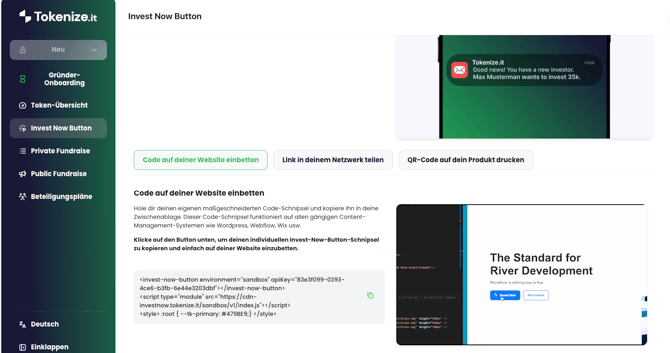
Wix
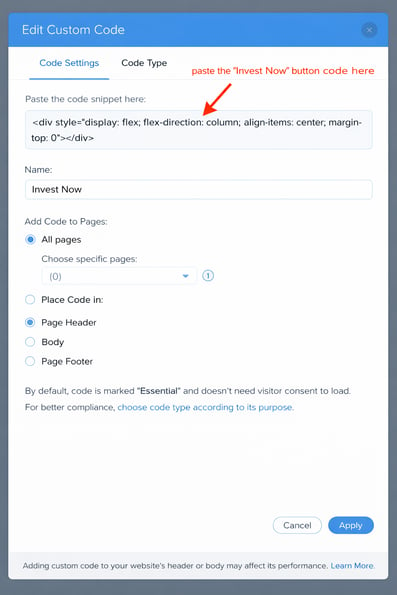
To enable the integration of the code, you must have at least a basic subscription and a domain.
.png?width=670&height=473&name=image%20(22).png)
Choose an appropriate location on your website and insert the Invest Now Button code into the code section.
WordPress
You'll need the paid version of WordPress to access full file editing and plugin installation capabilities.
Insert the code into the appropriate section of your theme or plugin.
.png?width=631&height=263&name=image%20(24).png)
Webflow
A basic subscription and domain are required to integrate the code.
.png?width=663&height=282&name=image%20(26).png)
Troubleshooting
"null" is shown instead of the company name above the form
Open the console and the network tab of your browser's developer tools.
If you see a failed request to the URL https://app.beel.com/api/trpc/investNowButtonVX.getInvestNowButtonData (X in VX is a number), check whether your API key is correct.
If you use the "Content-Security-Policy" header in your server configuration or in an "http-equiv" meta tag, add these two directives to the header or meta tag value:
script-src 'self' https://cdn-investnow.beel.com; connect-src 'self' https://app.beel.com;